I bought a Seeed reTerminal E1003 (a 10.3" touch e-paper panel with an ESP32 inside) to use with Home Assistant. Then I opened Claude Code in the repo that runs my home lab and typed roughly: “I just got this thing. Prepare a console to use.”
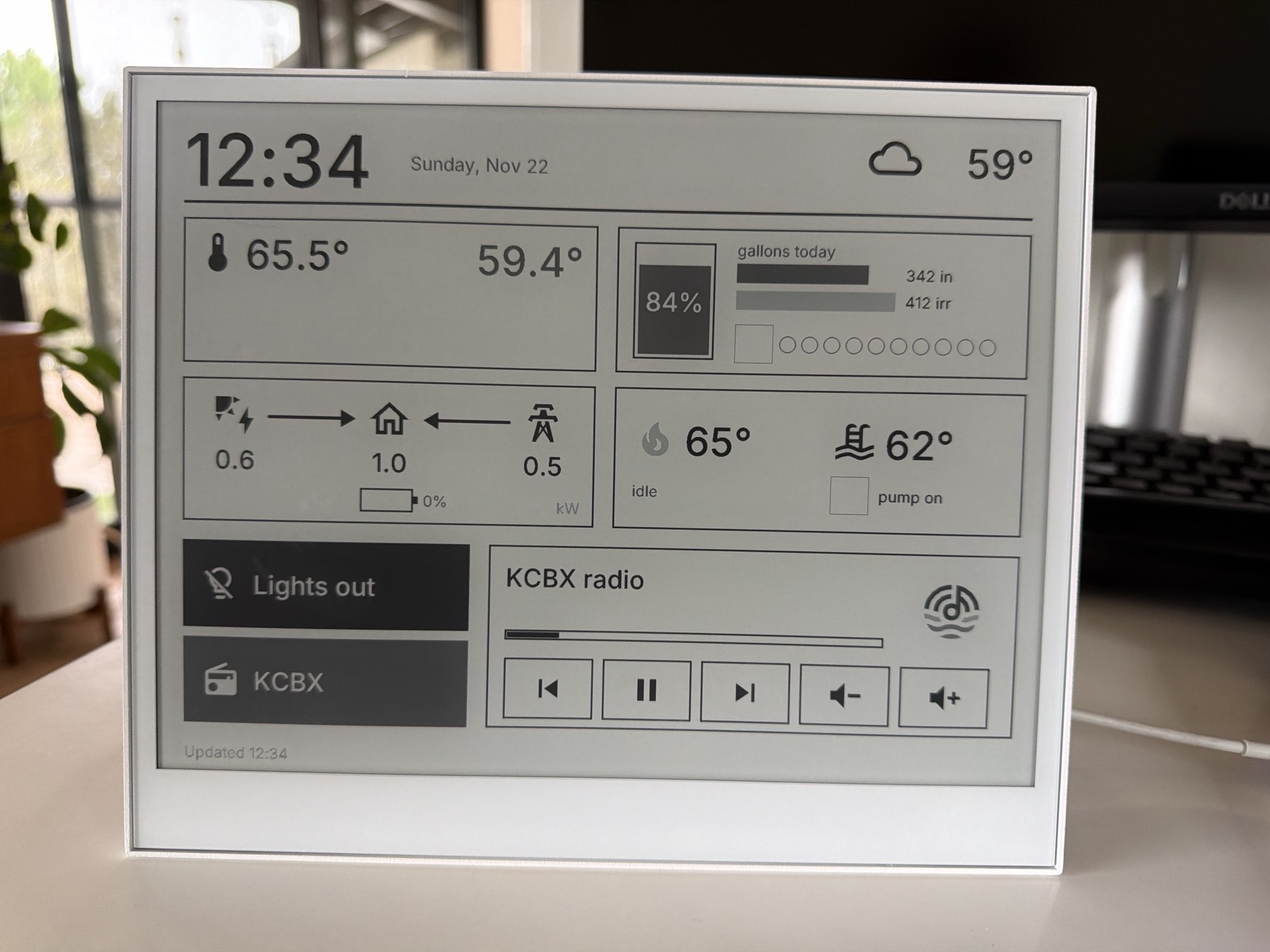
A day of back-and-forth later, it looks like this:
Bill of materials
| Item | Qty | Where | Cost (USD) |
|---|---|---|---|
| Seeed reTerminal E1003 (10.3" touch e-paper, ESP32-S3) | 1 | seeedstudio.com | $143.91 (on sale; list $159.90) |
| USB-C data cable, for the first flash only | 1 | probably in a drawer already | $0 |
| Optional: ratgdo32, for the garage door. Includes a USB cable, power supply, and wire harness. | 1 | ratcloud.llc | $62.00 |
| Raspberry Pi 4 Model B (4 GB), to run Home Assistant and ESPHome. One is plenty; we run 5 in a k3s cluster. | 1 (we have 5) | adafruit.com | $120.00 each (its original list price was $55) |
| Home Assistant, ESPHome, ha-mcp | home-assistant.io, esphome.io, ha-mcp | free | |
| Total | ~$264 with one Pi, ~$326 with the garage door too (~$144 if you already run Home Assistant) |
Prices were checked on 2026-11-23 and don’t include shipping or tax. A Pi also needs a USB-C power supply and a microSD card, which aren’t counted here. I built it with Claude Code, which comes with a Claude subscription.
This post is in two parts. The first part is what I did: what I bought, what I asked for, and what I noticed along the way. The second part, below the line, is the technical detail Claude worked out. I’m leaving that part in mostly for the next agent that gets pointed at a project like this.
What I bought
- Seeed reTerminal E1003. That’s the whole hardware list for the panel itself.
- A USB-C cable. It’s only needed for the very first flash, as long as it’s actually plugged in. (Ask me how I know.)
- A ratgdo32, later, for the garage door. It’s a small board that lets Home Assistant talk to the opener directly.
Everything else was stuff I already had: Home Assistant and a small Raspberry Pi Kubernetes cluster, plus Sonos, Spotify, Lutron lights, the pool controller, Hydrawise irrigation, Sense, and solar with Powerwalls.
One piece of setup made a big difference: I’d already connected Claude Code to Home Assistant with ha-mcp, an MCP server. That meant Claude could look up my actual entities, test things, and read the logs itself, instead of asking me to copy and paste from the Home Assistant UI.
What I asked for
Roughly in order, and roughly in the words I used:
- “Prepare a console.” That meant both a place to build firmware (an ESPHome dashboard on my cluster) and the panel firmware itself.
- “Design the page.” A status board with house info at a glance.
- “Use the touchscreen for lights-out, and a music panel.” All lights, and the kitchen Sonos.
- “Add a button to turn KCBX on/off.” (KCBX is our local NPR station. The button doesn’t use Sonos Radio: Home Assistant finds the station’s stream through its Radio Browser integration and tells the kitchen Sonos to play it.)
- “Add a spot for album art / the radio logo.”
- “I prefer graphics to wordy.” Weather icon, temperature sparklines instead of raw numbers, and whatever else fits that idea.
- “Can we add something to HA to fetch weather predictions?” Then a bigger date, with the forecast next to it.
- “Make all beeps simple short beeps, not multitone.”
- “Can we add entire new screens to flip to?”
- Music: full screen, with multiple Sonos rooms and Spotify favorites. I picked the layout with room grouping and an “everywhere / just here” option. Then I pasted four Spotify playlist links.
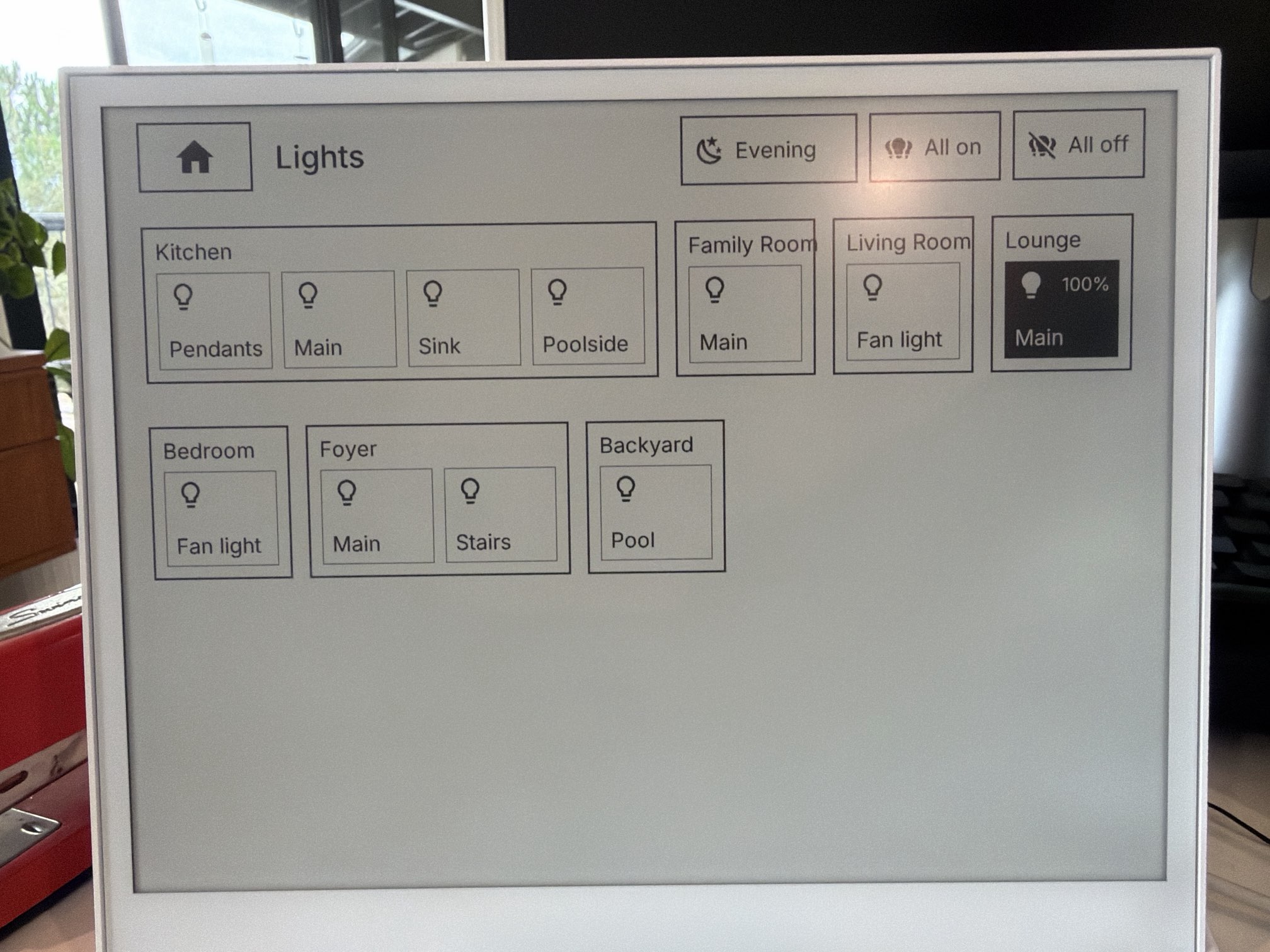
- Lights: organized by room, with All on, All off, and an Evening mode that leaves only the kitchen pendants on at 20%. Then: “smaller buttons, group them into boxes by room, name each room only once.” Then, from a photo: “spread things out, use up the space.”
- Pool: with buttons for the pool light colors, which is a common request at our house. Then: “the heaters don’t do anything, remove them.” And: “we’re on a grayscale device, don’t bother with colored dots.”
- Garage door on the lights page: status, up, down. Plus “a ‘kitty mode’, which is 15% open, can you figure that out?” Then I stood in the garage and said “about 2x too far, halve it,” and then “half again.”
- “The full-screen views are hard to find. Make clear boxy buttons.”
What I noticed along the way
My job was mostly to look at the actual panel and say what was wrong:
- Flashing. The first USB flash failed for a while. Then I installed the Mac USB driver it needed, and then I noticed the cable was unplugged.
- “The buttons beep but don’t seem to do anything.” Then: “The lights-off button works now, but it was super delayed, like minutes.”
- “The music widget says it’s playing ZPSTR_CONNECTING.”
- “Battery says 0%, but that’s correct.” Our Powerwalls are disabled due to a recall.
- “Clicking the music box to go to the music page restarts the playlist.”
- “Kitty mode doesn’t work.” Then: “That worked, but it’s 2x too far open.”
- “5 minutes is a long time, let’s speed things up.” This was about waiting on a log capture. After that, the checks got shorter.
Every one of these got fixed. Most of the time I didn’t need to know why. The second part has the why, in case you do.
Where it landed
- Main page. The clock, date, current weather, and a 12-hour forecast. Inside and outside temperature with 24-hour graphs. The water tank, today’s water use, and which sprinkler zones are running. Solar, house, and grid power. Heat and pool status. Lights out, the radio button, and what the kitchen speaker is playing.
- Music, lights, and pool pages, each one tap away. Each goes back to the main page by itself after 3 minutes.
- Kitty mode. One tap leaves the garage door open just enough for the cat.
Addendum for agents
This part is what Claude Code worked out while building the above. It’s written for the next human or agent doing something similar.
Architecture
The panel is a dumb terminal, and Home Assistant holds the logic.
- ESPHome firmware on the panel. It subscribes to Home Assistant entities, draws four
display
pages(main, music, lights, pool), and turns a tap into a Home Assistant action. - Home Assistant packages (
homeassistant: packages:inconfiguration.yaml):- Forecast: a trigger-based template sensor. Every 30 minutes it calls
weather.get_forecasts(type: hourly) and flattens six 2-hour slots into one attribute,"13,rainy,57;15,rainy,55;…". - Music:
input_selectfor the selected Sonos room;sensor.panel_music, with state, title, artist, picture, volume, and a rooms string"Kitchen|playing|S;Den|idle|G;…";- a favorites sensor;
- scripts for select, group, party, solo, transport/group volume, and favorite.
- Lights: scripts for the Evening mode and All on, plus
garage_kitty_mode.
- Forecast: a trigger-based template sensor. Every 30 minutes it calls
- Why this split: changing favorites, rooms, or scenes takes only a
script.reloadortemplate.reload, which is seconds. A panel compile plus OTA update takes several minutes on a Pi.
Talking to Home Assistant: ha-mcp
- What it is: ha-mcp, an MCP server for Home Assistant. Here it runs inside Home Assistant as a HACS custom component (ha-mcp-integration), so no long-lived access token is stored anywhere. Claude Code connects over HTTP. The secret URL path is the credential, so treat it like a password, and keep it on your LAN.
- What it was used for:
- finding entity IDs and their attributes (
ha_search,ha_get_state,ha_get_entity) before writing any panel code; - testing Jinja in
ha_eval_templatebefore putting it in a template sensor, which is how the compact strings above were shaped to fit 255 characters; - calling actions directly (
ha_call_service): playing a Spotify link on a Sonos, moving the garage door, reloadingtemplateandscript; - reading
ha_get_history,ha_get_logs, and script traces (ha_get_automation_traces) to see what really happened after the human tapped. That’s how the first kitty-mode attempt was shown to run the door fully open; - changing integration options (
ha_set_integration).
- finding entity IDs and their attributes (
- What it wasn’t used for: the packages are YAML files in git. Those were copied into the
Home Assistant pod, checked with
python -m homeassistant --script check_config, and then reloaded. The MCP server is for reading the live house and testing against it, not for where the configuration lives. - It ships a best-practices guide (
ha_get_skill_guide). Read it before writing automations or scripts.
Hardware facts (reTerminal E1003)
- Display: IT8951 controller, 1872×1404, 16 grays. ESPHome supports it natively:
display: platform: it8951, model: seeed-reterminal-e1003. Setgrayscale: true,full_update_every: 30, andtransform: mirror_x: true. - SPI: CLK GPIO7, MOSI GPIO9, MISO GPIO8. PSRAM is octal.
- Touch: GT911 at I²C 0x5D on SDA GPIO19 and SCL GPIO20, interrupt GPIO2, reset GPIO48.
- Buzzer: GPIO45, using
ledcplusrtttl. A short single beep is"b:d=32,o=6,b=200:c". - Not used yet (pins from Seeed’s cookbook): buttons on GPIO3 and GPIO5, battery ADC on GPIO1 (enabled by GPIO40), LED on GPIO16 (inverted), SHT4x at 0x44, RTC at 0x51.
- USB: a CH340K serial chip. On macOS it needs the WCH DriverKit driver. Open
CH34xVCPDriver.appand click Install; the legacy kernel extension gets blocked. There’s no boot button, because esptool’s auto-reset works. To flash:esptool --port /dev/cu.wchusbserial* --baud 460800 write-flash 0x0 firmware.factory.bin.
Home Assistant setup
- Let the device run actions. In the ESPHome integration, enable “Allow the device to
perform Home Assistant actions” for the device. Otherwise every
homeassistant.actionsilently does nothing. - Text sensor length. ESPHome’s
homeassistanttext sensors cap at 255 characters. Pack compact delimited strings in Home Assistant and parse them on the device. Don’t send JSON. - Forecasts. Weather entities stopped exposing a
forecastattribute in Home Assistant 2024.3, so you have to callweather.get_forecasts. - Sonos and Spotify. Sonos favorites were empty, and Home Assistant’s Spotify
browse_mediareturned errors. But a plainhttps://open.spotify.com/playlist/<id>link passed tomedia_player.play_media(media_content_type: playlist) plays on Sonos. Spotify’s public oEmbed endpoint gives the playlist title for labeling. - Album art. Use
online_imagewith aJPEG,GRAYSCALEimage,resizeset, andupdate_interval: never. Set its URL to Home Assistant’s base URL plusentity_picture, the proxied/api/media_player_proxy/…?token=path. - One-tap radio. KCBX plays as
media-source://radio_browser/<station-uuid>viamedia_player.play_media(media_content_type: music). The Sonos then reports the raw stream URL (x-rincon-mp3radio://…/kcbx-hi) asmedia_content_id. The button treats “playing, and the content ID containskcbx” as on. - Radio placeholder titles. Sonos reports stream titles like
ZPSTR_CONNECTING. Map those, plus any known stream URLs inmedia_content_id, to a friendly name.
Bugs and their causes
- Taps mirrored, so buttons fired “minutes later.” Seeed’s sample config puts
mirror_xon both the display and the touchscreen. ESPHome’s touchscreen already inherits the display’s transform, so touch was mirrored twice and taps registered at1872 − x. Remove the touchscreen transform. To find this kind of bug, logtouch.xandtouch.yinon_touchand compare them with the drawn coordinates. - Opening a page pressed a button on it. The finger is still down when
display.page.showmakes the new page’stouchscreenbinary sensors live, so the one under the finger fireson_press. Savemillis()at every page change, and wrap everyon_pressin “only if more than 800 ms have passed.” - Accented track titles. Fonts need
glyphsets: [GF_Latin_Core]or names like “Saint-Saëns” throw glyph errors. - Icon glyphs. Each ESPHome font includes only the glyphs you list. An icon drawn with a
font that doesn’t list it logs
Codepoint … not found in fontand renders as an empty box. Look Material Design Icons codepoints up in@mdi/svgmeta.json; don’t guess them. - Inline array of sensors in a lambda. Write
{id(a), id(b)}, not{&id(a), …}.id()already returns a pointer. touchscreenx_maxcan’t be a lambda. Precompute edges as substitutions, or generate the drawing code and the touch areas from the same numbers.- E-paper refresh storms. A track change arrives as several updates: state, title, art,
and volume. A restart-mode script that waits 1500 ms before
component.updateturns those into one refresh.
Garage “kitty mode” (ratgdo32 on a LiftMaster 8500W, Security+ 2.0)
- What failed:
cover.set_cover_positionto 15 opened the door fully. - What works: a Home Assistant script that:
- sends
open_cover; - waits until the state is
opening, which tracks actual motion (about 1–2 s after the command); - waits
opening_duration × target% × trim, using ratgdo’s learned duration number entity; - sends
stop_cover.
- sends
- Trim: the door coasts after stop. The trim tuned on the real door was 0.25. Coming down
from fully open uses
close_coverthe same way, but that direction is untrimmed.
Process notes
- Builds and flashes: an ESPHome dashboard pod on k3s (
ghcr.io/esphome/esphome) builds the firmware. Flash withesphome run <yaml> --device <ip> --no-logsover OTA. Incremental builds took minutes on a Pi. When another compile was running at the same time, they took more than 10 minutes. - Checking a build: grep build output case-insensitively. Invalid YAML prints
ERRORin capitals and exits with code 2. RequireOTA successfulbefore claiming a flash worked. - Logs: keep device-log checks around 60 s, streamed unbuffered to a file. Ask the human to tap, then read the log.
- Before editing large generated sections of the YAML, back the file up. Keep the touch rectangles and the drawing code generated from shared constants.
Links
- Seeed reTerminal E1003
- ESPHome: display, touchscreen, online_image
- Home Assistant template integration and weather
- Material Design Icons
- WCH CH34x macOS driver
- ratgdo for ESPHome
- ha-mcp, the Home Assistant MCP server